
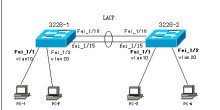
Cisco G0/25 — Huawei G0/0/1
Cisco G0/27 — Huawei G0/0/2
Huawei 스위치의 링크 어그리게이션(Link Aggregation) 설정에는 manual과 lacp-static 두 가지 모드가 있습니다. 별도로 설정하지 않으면 스위치 기본값은 manual이므로, 반드시 수동으로 lacp-static으로 변경해야 합니다. 이 점이 매우 중요하며, 그렇지 않으면 Cisco 스위치와 LACP 협상을 성공적으로 맺을 수 없습니다.
Huawei 스위치
#interface Eth-Trunk1
port link-type trunk
port trunk allow-pass vlan 2 to 4094
mode lacp-static //링크 어그리게이션 모드 변경
max active-linknumber 2 //최대 활성 링크 수를 2로 설정
bpdu enable //BPDU 활성화
#lacp priority 100
#interface GigabitEthernet0/0/1
eth-trunk 1
undo ntdp enable
undo ndp enable
(포트를 설정하기 전에 반드시 포트의 기존 설정을 모두 지우고 전부 undo해야 합니다. 그렇지 않으면 eth-trunk 명령을 적용할 수 없습니다. 이전에 해당 포트를 trunk 포트로 설정한 적이 있다면 undo port link-type으로 trunk 상태를 해제할 수 있습니다)
#interface GigabitEthernet0/0/2
eth-trunk 1
undo ntdp enable
undo ndp enable
Cisco 스위치
interface port-channel1
switchport trunk encapsulation dot1q
switchport mode trunk
interface g0/25
switchport trunk encapsulation dot1q
switchport mode trunk
channel-group 1 mode active
interface g0/27
switchport trunk encapsulation dot1q
switchport mode trunk
channel-group 1 mode active





