
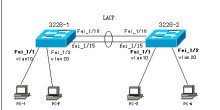
Cisco G0/25—Huawei G0/0/1
Cisco G0/27—Huawei G0/0/2
Huawei switches support two link aggregation modes: manual and lacp-static. If no configuration is applied, the switch defaults to manual, so you must manually change the mode to lacp-static. This is important, otherwise it cannot successfully negotiate LACP with a Cisco switch.
Huawei Switch
#interface Eth-Trunk1
port link-type trunk
port trunk allow-pass vlan 2 to 4094
mode lacp-static //Change the link aggregation mode
max active-linknumber 2 //Set the maximum number of active links to 2
bpdu enable //Enable BPDU
#lacp priority 100
#interface GigabitEthernet0/0/1
eth-trunk 1
undo ntdp enable
undo ndp enable
(Before configuring the port, you must clear all existing port configuration, undoing everything, otherwise the eth-trunk command cannot be applied. If the port was previously configured as a trunk port, you can use undo port link-type to clear the trunk status)
#interface GigabitEthernet0/0/2
eth-trunk 1
undo ntdp enable
undo ndp enable
Cisco Switch
interface port-channel1
switchport trunk encapsulation dot1q
switchport mode trunk
interface g0/25
switchport trunk encapsulation dot1q
switchport mode trunk
channel-group 1 mode active
interface g0/27
switchport trunk encapsulation dot1q
switchport mode trunk
channel-group 1 mode active





