
Introduction
When learning networking, hands-on labs are unavoidable — yet most people don’t have real hardware and can’t build a real environment. Fortunately, the networking field offers a wealth of simulators that can faithfully emulate more than 90% of functionality, achieving a level of realism that is hard to distinguish from the real thing. This is good news for network learners. Below we introduce the simulators most commonly used by network engineers.
Cisco or Huawei?
Before we begin, let’s answer a common question: Just starting out in networking — should I learn Cisco or Huawei?
Purely from a technical standpoint, there is no difference between Huawei and Cisco; conventional technologies are exactly the same. But as the Chinese saying goes, “old ginger is spicier.” After all, Cisco has been in training longer than Huawei, its technical framework and materials are richer, and its products support more features. Purely for technical learning, I personally lean toward Cisco. That said, in recent years Huawei’s certification system has also developed considerably, and the gap is not large. If you’re going for certifications at the NA/NP level, I don’t think there’s much difference between testing with Cisco or Huawei — both amount to memorizing question banks, and anyone of normal intelligence can pass. For IE, I’d suggest Huawei, since the certification can be registered with an employer; the money isn’t much, but money is money!!!
Finally, a reminder: don’t get hung up on command lines. Once you know one vendor’s commands, you’ll basically know the others’ — or at least be able to read them. In real projects, proficiency comes with practice; commands are the least important thing!!!
Cisco Simulators
Cisco can be called the “veteran” of the networking field, and it has the most simulators. Common ones include PT (Cisco Packet Tracer), GNS3, EVE-NG, Dynamips, Xiaofan Simulator, Gongda Ruipu Simulator, and others. The first three are the most widely used today: PT (Cisco Packet Tracer), GNS3, and EVE-NG.
PT (Cisco Packet Tracer)
Cisco’s official simulator, it does not run a real Cisco IOS system and has some bugs. Installation and configuration are relatively simple, and resource usage is fairly low. It can be used at the beginner stage, but at advanced stages such as NP and even IE, its use is strongly discouraged!!! Among industry people, if you keep using PT, it always gives the impression that you’re rather low-end.

PT simulator topology diagram
GNS3
GNS3 is a simulator that runs a real Cisco IOS system, with a high degree of fidelity. Its routing performance is excellent; its switching has minor shortcomings, but it can complete basic switching labs. This is also the simulator I like most and am most accustomed to. Ten years ago, most of my CCIE labs relied on GNS3. Back then there was no mature IOU and no EVE, and my computer had only 2 GB of RAM, later expanded to 4 GB. Many people today probably can’t imagine how I ran CCIE labs on that beat-up machine. There’s always a way — every lab can be broken down.
Today GNS3 can be used together with IOU and can complete 99% of Cisco labs. For an ordinary person learning Cisco, knowing this simulator is actually enough.

GNS3 simulator topology diagram
EVE-NG
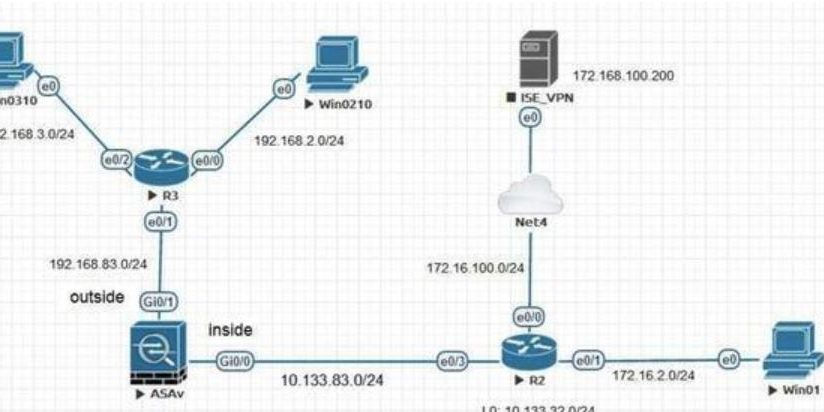
A simulator released in recent years, it is extremely powerful, and its interface is more attractive than PT’s and GNS3’s — classy and high-end! It integrates IOU functionality and can perfectly emulate routers and switches. Even more impressive, it can import images for Fortinet, F5, ASA, and others, simulating firewalls, load balancers, and other equipment from major vendors!!! For those who enjoy tinkering with high-end gear, this is definitely your cup of tea. But simulating security devices is quite resource-hungry, especially memory — ideally you’ll want 16 GB+.

EVE-NG simulator topology diagram
Cisco has many simulators; it’s advisable to choose one between GNS3 and EVE-NG. There’s no need to spend too much time studying simulators — knowing one is enough. After all, learning the technology is what matters most.
Huawei Simulators
Huawei’s simulator is simpler — there’s only one, ENSP.
- ENSP (Enterprise Network Simulation Platform)
- A free, extensible, graphical network device simulation platform provided by Huawei
- Can simulate enterprise network routers, switches, WLAN, firewalls, and other devices
- Graphical, can interconnect with real devices, and supports distributed deployment
H3C Simulators
H3C’s simulator is HCL, which is in fact used less often. Although H3C has a fairly high market share, its training is mediocre, and its materials are far fewer than Cisco’s and Huawei’s. So when learning networking, we generally don’t recommend studying the H3C system — unless you’re an H3C reseller and have no other choice.





