
1. Communication Media and Data Links:
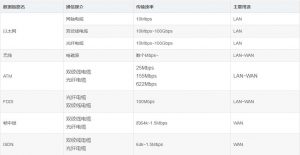
The unit of transmission rate is bps (Bits Per Second). Strictly speaking, the speed at which signals travel through any transmission medium is constant. Therefore, even if data links have different transmission rates, the transmission speed will not fluctuate (because the speed of light and electric current is constant). Transmission rate is also called bandwidth. The greater the bandwidth, the stronger the network’s transmission capability.
In addition, the actual transmission rate between hosts is called throughput. Its unit is the same as that of bandwidth, both being bps. Throughput also measures information such as the host’s CPU processing capability, the degree of network congestion, and the proportion of the packet occupied by the data field (excluding the packet header, counting only the data field itself).
2. Network Interface Card (NIC):
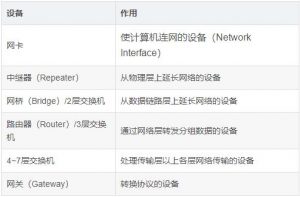
A network interface card (NIC, Network Information Center) is sometimes also called a network adapter, NIC, or LAN card. If a laptop does not have a built-in NIC, you can insert a NIC via ExpressCard, CardBus, CompactFlash, or USB and then connect to a network.
3. Repeater:
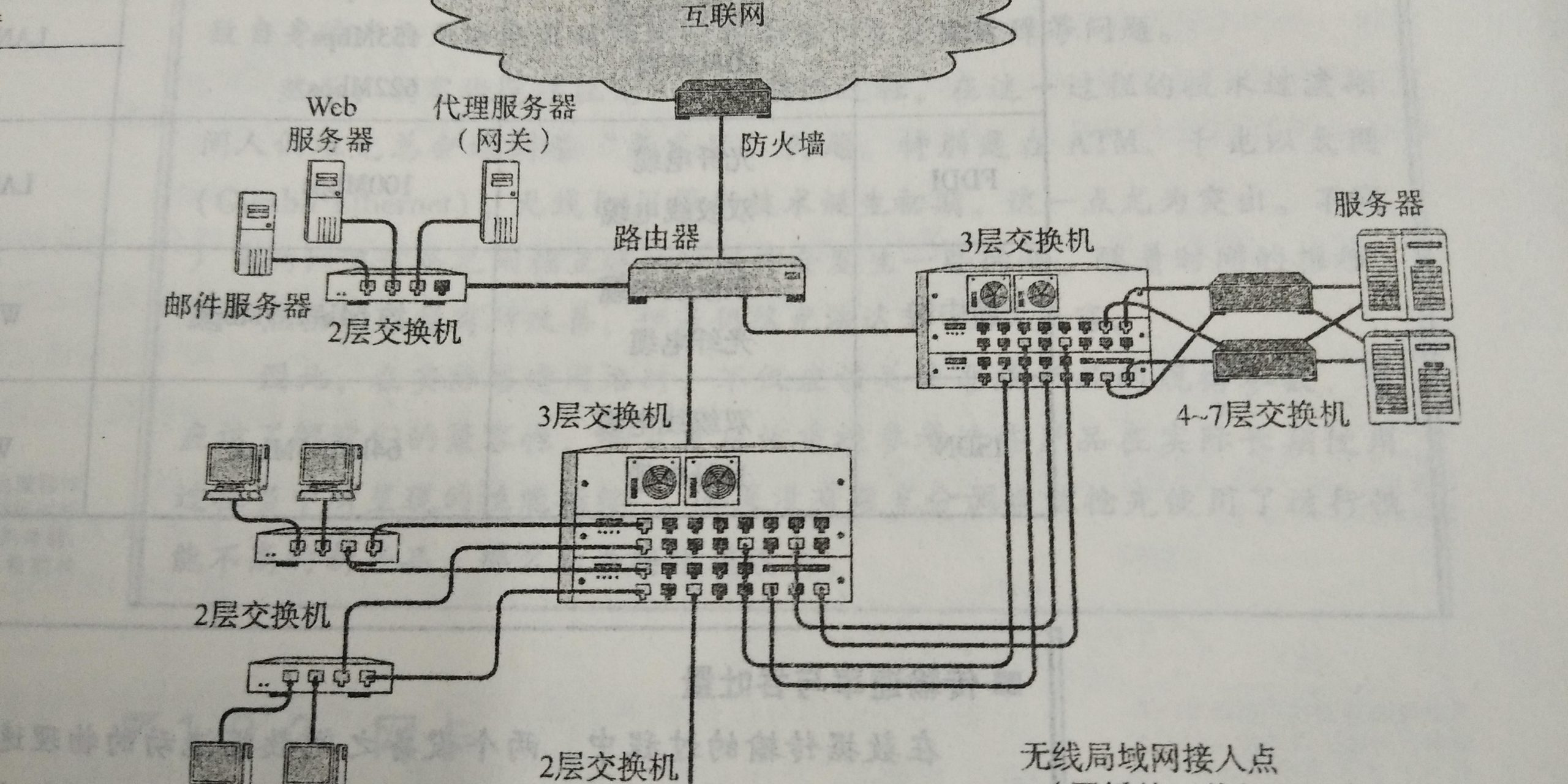
A repeater is a device that extends a network at the first layer of the OSI model—the physical layer. The electrical or optical signal transmitted over a cable is reshaped and amplified by the repeater and then sent to another cable. Some repeaters can perform conversion between different media. However, a repeater cannot forward between media with different transmission speeds.
The distance over which a network can be extended by repeaters cannot be expanded indefinitely.
Some repeaters can provide multiple ports. Such repeaters are called repeater hubs or hubs. Therefore, a hub can also be regarded as a multi-port repeater, in which each port can function as a repeater.
4. Bridge / Layer 2 Switch:
A bridge is a device that connects two networks at the second layer of the OSI model—the data link layer; for this reason, a bridge is sometimes also called a Layer 2 switch (L2 switch). It can recognize data frames at the data link layer, temporarily store these data frames in memory, and then regenerate the signal to forward them as an entirely new frame to another connected network segment. Because it can store these data frames, a bridge can connect data links with completely different transmission rates, such as 10BASE-T and 100BASE-TX, and it does not limit the number of connected network segments.
By checking the FCS in the data bits (the bits in the data frame are verified using CRC. Sometimes noise causes the data signal to grow weaker during communication, and this CRC is used to check whether the data frame has been corrupted as a result), a bridge discards damaged data, thereby preventing it from being sent to other network segments. In addition, a bridge can control network traffic through address self-learning mechanisms and filtering functions.
The switching hub commonly used in Ethernet and other networks is now basically a type of bridge as well. Each port in a switching hub to which a cable is connected can provide bridge-like functionality.
5. Router / Layer 3 Switch:
A router is a device that connects two networks at the third layer of the OSI model—the network layer—and forwards packets. A bridge processes data based on physical addresses (MAC addresses), whereas a router/Layer 3 switch processes data based on IP addresses. Accordingly, the network layer address in TCP/IP is the IP address.
A router can connect different data links. For example, it can connect two Ethernets, or connect an Ethernet with FDDI.
A router also serves to share the network load, and some routers even provide certain network security functions.
Because a router divides data links, broadcast messages at the data link layer can no longer propagate further.
6. Layer 4–7 Switches:
Layer 4–7 switches handle data from the transport layer to the application layer in the OSI model. Typical Layer 4–7 switches include load balancers, WAN accelerators, special application access accelerators, and firewalls (which can prevent illegal requests from the Internet).
In addition, in actual communication, when the network is relatively congested, people want priority given to communication requests with high timeliness requirements, such as voice, while slowing down the handling of communication requests that can tolerate a slight delay, such as email or data forwarding. This handling is called bandwidth control and is also one of the important functions of Layer 4–7 switches.
7. Gateway:
A gateway is a device in the OSI reference model that converts and forwards data from the transport layer to the application layer. Like Layer 4–7 switches, it handles data at the transport layer and above, but a gateway not only forwards data but also converts it. It usually uses a presentation-layer or application-layer gateway to translate between two protocols that cannot communicate directly, ultimately enabling communication between them.
For example, when using the WWW (World Wide Web), a proxy server is sometimes used to control network traffic and for security reasons. Such a proxy server is also a type of gateway, called an application gateway.
A firewall is a product that communicates through a gateway and improves security for different applications.





