
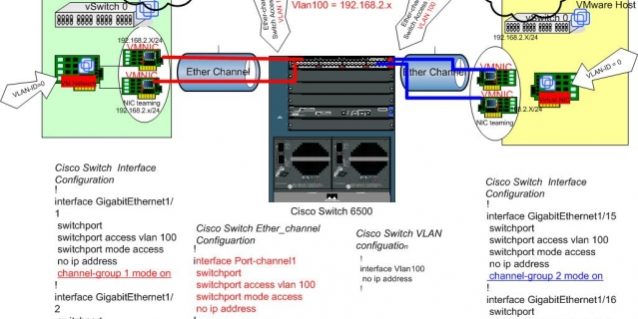
This article describes the concepts, limitations, and some configuration examples (specifically for Cisco and HP) of link aggregation, NIC teaming, Link Aggregation Control Protocol (LACP), and EtherChannel connections between ESXi/ESX and physical network switches.

Link aggregation concepts:
- EtherChannel: This is a link aggregation (port trunking) method used to provide fault tolerance and high-speed connectivity between switches, routers, and servers (by combining two to eight physical Ethernet links to create a logical Ethernet link through the remaining failover links). For additional information about Cisco EtherChannel, see the EtherChannel Introduction provided by Cisco.
- LACP or IEEE 802.3ad: The Link Aggregation Control Protocol (LACP) is included in the IEEE specification as a method for controlling the bundling of multiple physical ports to form a single logical channel. LACP allows network devices to negotiate an automatic link bundle by sending LACP packets to a peer device (a directly connected device that also implements LACP). For detailed information about LACP, see the Link Aggregation Control Protocol whitepaper provided by Cisco.
Note: LACP is supported only in vSphere 5.1 and 5.5 using vSphere Distributed Switch (VDS) or Cisco Nexus 1000v.
- EtherChannel vs. 802.3ad: EtherChannel and the IEEE 802.3ad standard are very similar and pursue the same goals. There are, however, some differences between them, the most obvious being that EtherChannel is a Cisco proprietary product, whereas 802.3ad is an open standard.
- For detailed information about EtherChannel implementation, see the article Understanding EtherChannel Load Balancing and Redundancy on Catalyst Switches provided by Cisco.
Scenarios supported by EtherChannel:
- One IP to multiple IP connections. (Host A initiates two connection sessions to Host B and Host C)
- Multiple IP to multiple IP connections. (Host A and Host B initiate multiple connection sessions to Host C, Host D, and so on)
Note: One IP to one IP connections across multiple NICs are not supported. (A single connection session from Host A to Host B uses only one NIC).
- Compatible with all ESXi/ESX VLAN configuration modes: VST, EST, and VGT. For detailed information about these modes, see VLAN Configuration on Virtual Switch, Physical Switch, and Virtual Machines (1003806).
- Supported Cisco configuration: EtherChannel mode on – (EtherChannel only enabled)
- Supported HP configuration: Trunk mode
- Supported switch aggregation algorithm: IP-SRC-DST (short for IP-source-destination)
- Supported virtual switch NIC teaming mode: IP hash. However, note the following caveats:
Note: LACP support in vSphere Distributed Switch 5.1 supports only IP hash load balancing. In vSphere Distributed Switch 5.5, all load balancing algorithms are supported for LACP:
- Do not use beacon probing in combination with IP HASH load balancing.
- Do not configure standby or unused uplinks with IP HASH load balancing.
- vSphere Distributed Switch 5.1 supports only one EtherChannel per vNetwork Distributed Switch (vDS). However, vSphere Distributed Switch 5.5 supports multiple LAGs.
- Lower-end Cisco switches may have MAC-SRC-DST set by default and may require a different configuration. For detailed information, see the article Understanding EtherChannel Load Balancing and Redundancy on Catalyst Switches provided by Cisco.
interface Port-channel1

switchport

switchport access vlan 100

switchport mode access

no ip address

!

interface GigabitEthernet1/1

switchport

switchport access vlan 100

switchport mode access

no ip address

channel-group 1 mode on

!
ESX Server and Cisco switch topology and configuration example:
Run this command to verify the EtherChannel load-balancing mode configuration:
Switch# show etherchannel load-balance

EtherChannel Load-Balancing Configuration:

src-dst-ip

mpls label-ip

EtherChannel Load-Balancing Addresses Used Per-Protocol:

Non-IP: Source XOR Destination MAC address

IPv4: Source XOR Destination IP address

IPv6: Source XOR Destination IP address

MPLS: Label or IP
Switch# show etherchannel summary
Flags: D - down P - bundled in port-channel
I - stand-alone s - suspended
H - Hot-standby (LACP only)
R - Layer3 S - Layer2
U - in use f - failed to allocate aggregator
M - not in use, minimum links not met
u - unsuitable for bundling
w - waiting to be aggregated
Number of channel-groups in use: 2
Number of aggregators: 2
Group Port-channel Protocol Ports
------+-------------+-----------+--------------------------
1 Po1(SU) - Gi1/15(P) Gi1/16(P)
2 Po2(SU) - Gi1/1(P) Gi1/2(P)
Switch# show etherchannel protocol
Channel-group listing:
-----------------------
Group: 1
----------
Protocol: - (Mode ON)
Group: 2
----------
Protocol: - (Mode ON)
HP Switch Configuration Example
- HP switches support only two LACP modes:
- Active
- Passive
Note: LACP is supported only on vSphere 5.1 and 5.5 with a vSphere Distributed Switch or Cisco Nexus 1000V.
- Set the HP switch port mode to TRUNK to complete static link aggregation with ESXi/ESX.
- TRUNK mode on HP switch ports is the only aggregation method that supports compatibility with the ESXi/ESX NIC teaming mode IP HASH.
conf

trunk 10-13 Trk1 Trunk
To verify your port channel, run the following command:
ProCurve# show trunk

Load Balancing

Port | Name Type | Group Type

---- + --------- + ----- -----

10 | 100/1000T | Trk1 Trunk

11 | 100/1000T | Trk1 Trunk

12 | 100/1000T | Trk1 Trunk

13 | 100/1000T | Trk1 Trunk
Configuring Load Balancing in the vSphere/VMware Infrastructure Client
- Click the ESXi/ESX host.
- Click the Configuration tab.
- Click the Networking link.
- Click Properties.
- Click the virtual switch on the Ports tab, and then click Edit.
- Click the NIC Teaming tab.
- From the Load Balancing drop-down list, select Route based on IP hash. However, see the following caveats.
- Verify that two or more network adapters are listed under Active Adapters.
Note: LACP support in vSphere Distributed Switch 5.1 supports only IP hash load balancing. In vSphere Distributed Switch 5.5, all load balancing algorithms that support LACP are supported:
- NIC teaming must be set to IP hash on both the vSwitch and the port groups it contains (including the kernel management port). For more information about NIC teaming and EtherChannel, see the “Additional Information” section.
- Do not use beacon probing in combination with IP HASH load balancing.
- Do not configure standby or unused uplinks with IP HASH load balancing.
- vSphere Distributed Switch 5.1 supports only one EtherChannel per vNetwork Distributed Switch (vDS). However, vSphere Distributed Switch 5.5 supports multiple LAGs.
- If an EtherChannel exists between the blade chassis and the upstream switch, ESX/ESXi running on the blade system does not require IP hash load balancing. IP hash load balancing is required only when an EtherChannel exists between the blade and the internal chassis switch, or when the blade is running in network pass-through mode with an EtherChannel pointing to the upstream switch. For details on various scenarios, contact your blade hardware vendor.
LACP is supported only on vSphere ESXi 5.1 and 5.5 with a VMware vDistributed Switch. For more information, see Enabling or disabling LACP on an Uplink Port Group using the vSphere Web Client (2034277) and the What’s New in VMware vSphere 5.1 – Networking whitepaper.
Removing EtherChannel Configuration from a Running ESX/ESXi Host
To remove an EtherChannel, there must be an active network adapter on the vSwitch/dvSwitch. Ensure that the other host NICs in the EtherChannel configuration are disconnected (link down). Perform one of the following options:
- Disconnect the network cable from the network adapter (ensure that one remains online).
- Shut down the network port on the physical switch.
- Disable the vmnic adapter in ESXi. For more information, see Forcing a link state up or down for a vmnic interface on ESXi 5.x (2006074).
When only one NIC is connected, you can remove the port channel configuration from the physical network switch and change the NIC teaming setting from IP HASH to portID on the vSwitch/dvSwitch. For details about teaming, see NIC teaming in ESXi and ESX (1004088).





