Year: 2022

You are here:

Extending VMware ESXi Storage with Synology NFS

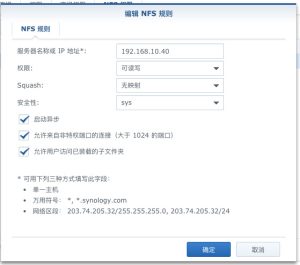
This article uses ESXi 6.7 and Synology NAS 6.x as examples. First, enable the NFS service on the Synology NAS; it is disabled by default. The steps are as follows. 1. In DSM, go to Control Panel > File Services > SMB/AFP/NFS, and check Enable NFS service. 2. In Control Panel, go to Shared Folder, select the folder you want ESXi to use, and click Edit. 3. Then select NFS Permissions, click Create, and note down the mount path. 4.

Learn More »

How to Connect to a Company Intranet via a Tunnel

1. When a branch office needs to connect to the head office intranet For branches with a large number of employees, device-based dial-in is recommended. Routing entries forward only the data that is actually needed, which improves office efficiency.   2. For employees working off-site who temporarily use 【the configuration methods for the built-in tunnel client on Windows 10{Item A} and Windows 7 {Item B} described below】 Please first confirm the company’s SSTP access address: (please consult your administrator) {If

Learn More »

Cisco and Huawei Switch Link Aggregation (LACP) Configuration Examples

Cisco G0/25—Huawei G0/0/1 Cisco G0/27—Huawei G0/0/2 Huawei switches support two link aggregation modes: manual and lacp-static. If no configuration is applied, the switch defaults to manual, so you must manually change the mode to lacp-static. This is important, otherwise it cannot successfully negotiate LACP with a Cisco switch. Huawei Switch #interface Eth-Trunk1 port link-type trunk port trunk allow-pass vlan 2 to 4094 mode lacp-static //Change the link aggregation mode max active-linknumber 2 //Set the maximum number of active links to

Learn More »

How to Configure Link Aggregation on a Huawei S5700 Switch

Example: Configuring Link Aggregation in Manual Load Balancing Mode Networking Requirements As shown in Figure 1, SwitchA and SwitchB are each connected to VLAN 10 and VLAN 20 networks through Ethernet links, and a large volume of data traffic is exchanged between SwitchA and SwitchB. The user wants to provide greater link bandwidth between SwitchA and SwitchB so that devices in the same VLAN can communicate with each other. The user also wants a certain degree of redundancy to ensure

Learn More »

Cisco Switch DHCP Snooping Explained with Examples

I. Common Issues with Deploying DHCP Services Setting up a DHCP server allows network parameters such as IP addresses, subnet masks, default gateways, and DNS servers to be assigned automatically to clients, which simplifies network configuration and improves management efficiency. However, there are some problems in the management of DHCP services, the most common of which are: · Rogue DHCP servers · DoS attacks against the DHCP server, such as DHCP exhaustion attacks · Users assigning IP addresses arbitrarily, causing

Learn More »

Data Encryption Error When Using Windows 10 Remote Desktop to Connect to Another Computer

Windows 10: When using Remote Desktop to connect to another computer, the following error occurs: “Because of an error in data encryption, this session will end. Please try connecting to the remote computer again.” This could be due to CredSSP encryption oracle remediation. HKEY_LOCAL_MACHINE\SOFTWARE\Microsoft\MSLicensing Solution 1: Type gpedit.msc in Run to open the Local Group Policy Editor. Go to Group Policy > Computer Configuration > Windows Settings > Security Settings > Security Options > System cryptography: Use FIPS compliant algorithms

Learn More »

Windows 2016 Server Security Configuration and Hardening

System Update Configuration Change the Windows Update Server If the default Windows Update server is slow, or if you use an Alibaba Cloud or Tencent Cloud server, you can switch to a different Windows Update server. Right-click the Start menu icon, select “Run,” and enter gpedit.msc. Navigate to “Computer Configuration” – “Administrative Templates” – “Windows Components” – “Windows Update,” then double-click “Specify intranet Microsoft update service location”: Select Enabled, then configure the intranet update service for detecting updates and the statistics

Learn More »

Windows Server 2016: Enable Photo Viewing and Preview Features

By default, Windows Server 2016 cannot view or preview images. Siwenlide shows you how to enable it using the following steps:   1. Press Win+R to open the Run dialog, type regedit and press Enter to open the Registry Editor.   2. In the Registry Editor, navigate to HKEY_LOCAL_MACHINE\SOFTWARE\Microsoft\Windows Photo Viewer\Capabilities\FileAssociations   3. In the right pane, create a new string value.   Create two entries, .jpg and .png, both with the value PhotoViewer.FileAssoc.Tiff   You can then view .jpg

Learn More »

How to Build a Network for Small and Medium-Sized Enterprises

Understand the overall office layout, and plan the placement of equipment and cabling. Understanding the overall office layout is the first priority. Small companies typically have around 5 to 20 employees and are generally divided into three areas: the workspace, the meeting area, and the manager’s office. Networking is mainly divided into wired and wireless networks. The wired network is primarily used for external office communication, while the wireless network is mainly used to connect wireless devices. For wireless, coverage

Learn More »

How to Troubleshoot Common Network Failures?

Network outages, lag, unstable connections and intermittent drops are common network problems. Where do these problems come from, and how do you troubleshoot them? It is a headache! Master the five commands below and the cause of every network problem becomes clear at a glance. How do you check your local IP address and router address? Knowing your computer’s IP address and your router’s address is the foundation of finding network faults. The commands below are all run in the

Learn More »